Share a quick paste without an account
Turn a short piece of text into a link that works for 24 hours, without signing up.
Available to visitors without an account; guest limits apply.
WHAT YOU GET WITH COPYPASTIA
Keep text, code, files, and link collections in your online workspace. When you are ready to share, send a link and choose who can open it and how long it stays available.
Try a guest text paste on the homepage, or compare account limits on Pricing.
A CLOSER LOOK
Share a handover note until Friday, or make event details available during a specific window. Set a start and end time; visitors outside that window see an availability message.
What happens next? The link stops showing the content after expiry. Your saved paste remains in your workspace.
Learn about time-limited pastes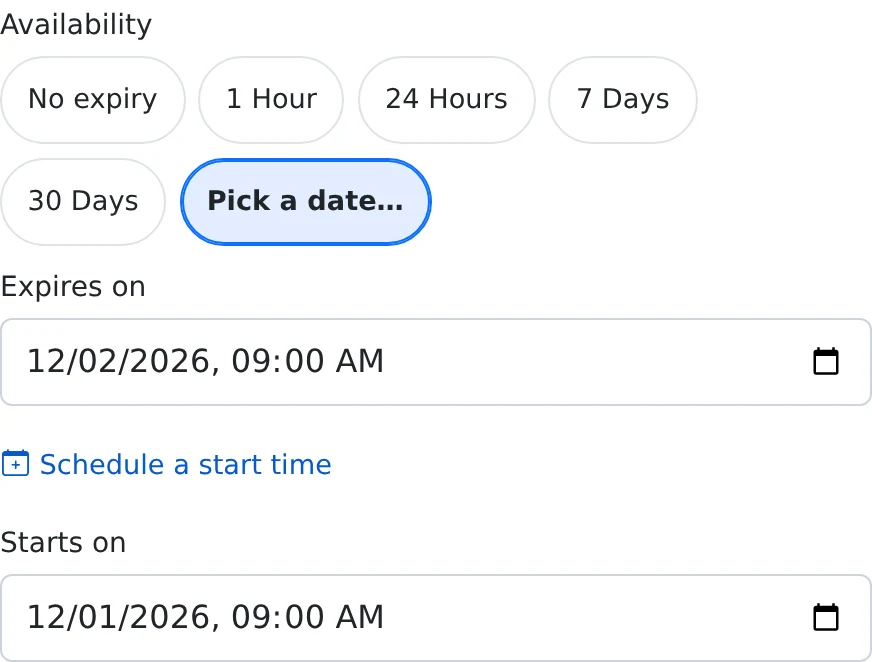 Example sharing settings · See the full walkthrough
Create a temporary text paste from the homepage and get a share link. Guest sharing has its own limits and expiry.
An account gives you a library to manage, organize, copy, and share. Storage, uploads, and content allowances depend on your plan.
Some sharing options and API access need an eligible plan. Each guide explains the requirements; Pricing shows current allowances.
THE FEATURE LIBRARY
Practical steps, example screenshots, and the details to know before you share.
24 guides
Turn a short piece of text into a link that works for 24 hours, without signing up.
Available to visitors without an account; guest limits apply.
Keep notes and reusable snippets together, with titles and syntax highlighting for code.
Account required; storage and usage limits depend on your plan.
Create readable instructions with headings, lists, links, tables, and code blocks.
Account required; check your plan for rich-text availability and limits.
Store supported files alongside your notes and give recipients a browser link.
Account required; maximum file size and accepted extensions depend on your plan.
Build a named reading list, project resource pack, or collection of useful websites.
Account required; the number of links per list depends on your plan.
Understand private storage, unlisted links, access codes, and public discovery.
Account required for share settings; sharing limits depend on your plan.
Choose one hour, 24 hours, seven days, 30 days, or a specific expiry date for a share.
Available in account share settings, subject to your sharing allowance.
Prepare a time capsule or announcement and hand out its link before the content becomes available.
Available in account share settings, subject to your sharing allowance.
Put a code prompt in front of a shared paste, with an optional wrong-code limit on paid plans.
Code-protected sharing is available to accounts; wrong-code limits require a paid plan.
Use Burn after reading for a one-time handoff, or set a maximum number of views.
Paid plan required.
Control repeated access, view budgets, wrong-code attempts, and periods without a view.
Paid plan required for these advanced sharing options.
Keep a share sealed until a selected period passes without an account check-in.
Paid plan required.
Save an encrypted text body and share the decryption key through the link, or split it between people.
Account and a browser supporting the encryption feature required.
Add an email entry screen or a paid unlock screen before a shared text paste.
Paid plan required; payment unlock also depends on the platform’s payment setup.
Choose a readable URL ending and let people open an ordinary share from their phone camera.
Custom links require an account share; QR codes are available on supported public pages.
Copy an iframe snippet for eligible public content and optionally limit the sites allowed to frame it.
An eligible public share is required; embed-domain restrictions require a paid plan.
Opt an eligible public share into Explore and add tags or a category to describe it.
Account and an eligible public share required.
Put your introduction, social profiles, and important links behind one public handle.
Account required; the link allowance and branding depend on your plan.
Return to the right note or file without scrolling through your entire library.
Account required; favorite limits depend on your plan.
Reuse text, create a separate copy, or change the visibility of selected items together.
Account required; new copies and public shares count toward plan limits.
Review total views, estimated unique visits, the last seven days, and referring pages.
Statistics are available to the item owner; email view digests require a paid plan.
Save and manage pastes from your own tools, or capture text and page URLs while browsing.
A plan with API access is required; daily request limits depend on the plan.
Keep account details current, add an authenticator check, and download an account data snapshot.
Account required.
Compare the allowances you need, manage your subscription, and track eligible referral activity.
Pricing is public; subscription and referral management require an account.
Try a shorter search, such as “share” or “file”.
Start with a note, a code snippet, or a file. Choose your sharing settings when you need a link.